Fly Scanning
Fly scanning is when detectors take measuments while one or more positioners are in motion, creating a range of measurements based on user specified points. This method is generally faster than traditional step scanning.
Flyscanning with Bluesky follows a general three method process
Kickoff: Initializes flyable Ophyd devices to set themselves up and start scanning
Complete: Continously checks whether flight is occuring until it is finished
Collect: Retrieves data from fly scan as proto-events
Most of the work that is done for fly scanning is done with
Ophyd. Bluesky’s way of fly scanning requires the Ophyd flyer device
to have the kickoff(), complete(), collect(), and
collect_describe() methods. Any calculation or configuration for
fly scanning is done inside the Ophyd device.
Modes of Fly Scanning
Fly scanning can be done in two modes:
Free-running – devices operate independently
Triggered – devices are synchronized at the hardware level
In free-running mode, the positioners and detectors operate independently from one another. Typically the positioners are set to cover a range at a given speed, while detectors repeatedly acquire data. This approach can be applied to many types of devices, but the points at which the detector is triggered are not predictable. While the position at each detector reading will be known, the positions will not be exactly those specified in the plan. This fly-scan mode is best suited for scans where measuring specific points is not critical, such as for alignment of optical components, e.g. slits. Grid scans are not supported for free-running mode.
In triggered mode, a positioner’s hardware will produce a signal that is used to directly trigger one or more detectors. Both the positioner and detectors must have compatible triggering mechanisms, and the physical connections must be made before-hand. Triggered mode is best suited for scans where the precise position of each detector reading is critical, such as for data acquisition. N-dimensional grid scans can also be performed in triggered mode.
For devices that support both modes, a flyer_mode signal shall be
provided that directs the device to operate in one mode or
another. The flyer_mode argument to
haven.plans.fly.fly_scan() will set all flyers to the given
mode if not None.
Data Streams
In all cases, each flyable device used in a fly scan will produce its
own data stream with the name of the device. By using the
combine_streams parameter to the haven.plans.fly.fly_scan()
or haven.plans.fly.grid_fly_scan() plans, it may be possible
to align the streams into a single “primary” stream based on
time-stamps of the collected data. Positions for positioners will be
interpolated based on timestamps of the detector frames. Not every
combination of flyers is compatible with this strategy: consult the
following table to see if data streams can be combined (✓) or will
cause ambiguous associations (✘).
1 detector |
2+ detectors |
|
|---|---|---|
1 positioner |
✓ |
✘ |
2+ positioners |
✓ |
✘ |
1 detector |
2+ detectors |
|
|---|---|---|
1 positioner |
✓ |
✓ |
2+ positioners |
✘ |
✘ |
Note
The fly-scanning machinery will still produce a “primary” data stream of those situations marked above as ambiguous (✘), however there is no guarantee that data are aligned properly.
Plans for Fly-Scanning
Haven provides several fly-scanning plans. Each one assumes that
flyers implement Ophyd’s
FlyerInterface. Flyer’s must also have
component signals for defining the parameters of the fly scan. These
signals do not need to have EPICS PVs; they can just be regular
Signal components:
start_position: center of the first bin to be measured, in motor engineering units
end_position: center of the last bin to be measured, in motor engineering units
step_size: width of each bin, in engineering units
fly_scan()
Haven’s fly_scan() mimics the Bluesky
scan() plan, except that it only accepts one
motor and accompanying arguments. Both detectors and motor must
implement Ophyd’s FlyerInterface. Notice
that dwell_time is
set separately.
import bluesky.plan_stubs as bps
import haven
haven.load_instrument()
RE = haven.run_engine()
# Prepare devices
aerotech = haven.registry.find("aerotech")
ion_chambers = haven.registry.findall("ion_chambers")
RE(bps.mv(aerotech.horiz.dwell_time, 0.2))
# Execute the fly scan
plan = haven.fly_scan(ion_chambers, aerotech.horiz, -1000, 1000, num=101)
RE(plan, sample_name="...", purpose="...")
This plan only works for one flyer motor since flying two motors from Bluesky does not ensure consistent timing between the flyers. If multiple motors should be flown following the inner_product pattern, they should be wrapped in a new Flyer object that can coordinate both motor trajectories.
grid_fly_scan()
Haven’s grid_fly_scan() provides an
N-dimension scan over all combinations of multiple axes, mimicing
Bluesky’s grid_scan() plan. The first motor
listed will be the slow scanning axis, and the last motor listed will
be the flyer. Each motor must have an accompanying start, stop,
and num arguments:
from bluesky import plans as bp, plan_stubs as bps
import haven

# (start, stop, num)
fly_params = (-100, 100, 21)
step_params = (-100, 100, 5)
dwell_time = 0.1

haven.load_instrument()

# Find the devices
ion_chambers = list(haven.registry.findall("ion_chambers"))
aerotech = haven.registry.find("aerotech")
# Create the run engine
RE = haven.run_engine()
# Set the dwell time per pixel separately
RE(bps.mv(aerotech.horiz.dwell_time, dwell_time))
# Set up the plan
plan = haven.grid_fly_scan(ion_chambers,
                           aerotech.vert, *step_params,
                           aerotech.horiz, *fly_params,
                           snake_axes=True)
# Run the plan
RE(plan, purpose="testing fly scanning", sample="None")
Note
The flyer’s
dwell_time
component is set outside of
grid_fly_scan(). This is in keeping with
Bluesky’s approach on setting acquisition times, where each device
has its own concept of acquisition time and so these need to be
explicitly set as determined by the hardware.
Aerotech-Stage
The Aerotech stage has a number of axes, for example, .horiz and
.vert. Each is a sub-class of EpicsMotor,
adding the FlyerInterface. Each of these
axes can be used as a flyer in the plans for fly-scanning.
Position-Synchronized Output (PSO)
The Ensemble controller can be configured to emit voltage pulses at
fixed distance intervals. These position-synchronized output (PSO)
pulses are used to trigger hardware to begin a new bin of
measurements. The Ophyd flyer device sends comands to the ensemble
controller to configure its settings. PSO pulses are sent in the form
of a 10us on pulse. These pulses are then set to only happen every
multiple integer of encoder step counts, corresponding to the Flyer
device’s step_size
signal. When possible, the pulses are set to only ocur within the
range of scanning.
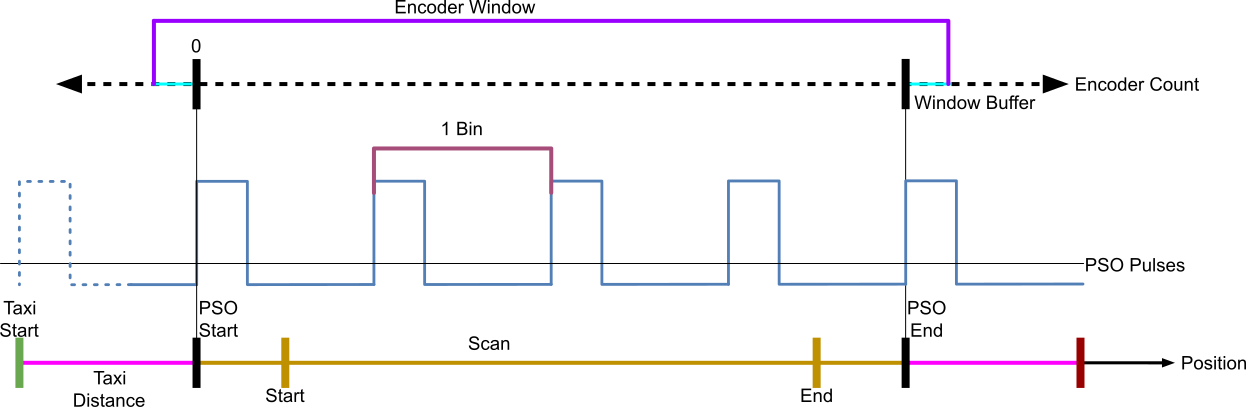
Diagram of PSO pulse timing. Encoder counts are an integer number of the smallest unit the controller can measure (e.g. nanometers). The distance from one pulse to the next equates to new bin on the scaler. Encoder window gives a range outside of which PSO pulses will be suppressed. Bottom line shows relative positions of key calculated and supplied parameters.
While the scaler can use these raw pules to create a bin, other detectors have other requirements. A DG645 delay generator is used to transform the pulses to match the various detectors. The trigger signal going to the scaler also goes through the delay generator, but the length of the delay matches the duration of the PSO pulse, so effectively output AB from the delay generator repeats the PSO pulses.
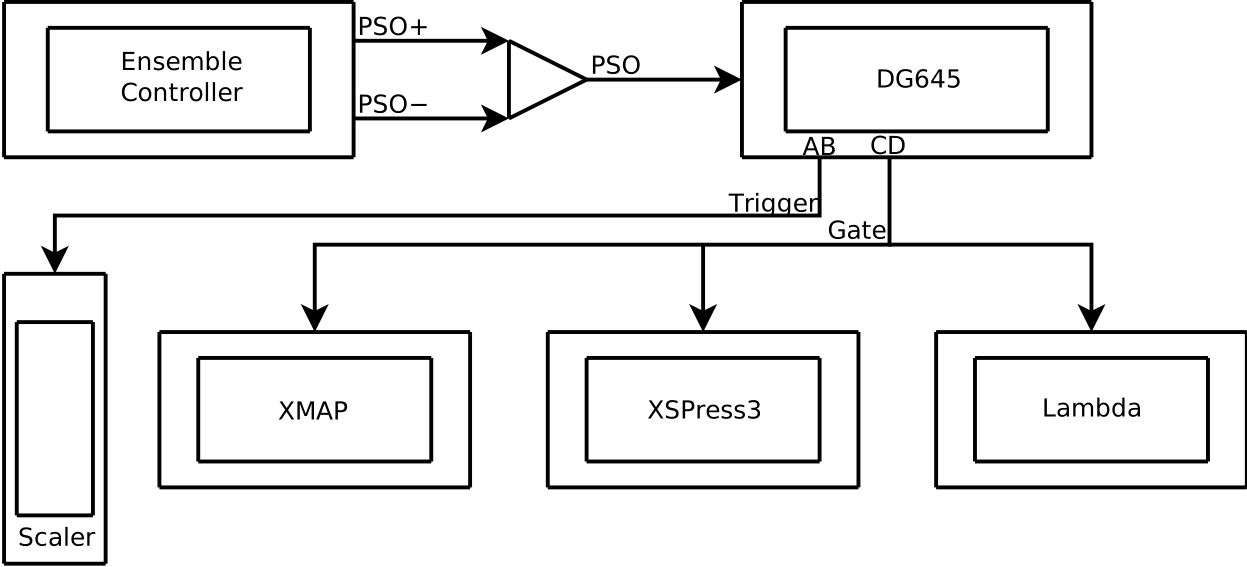
Control flow diagram of how hardware is connected for fly scanning. The trigger output mimics the trigger input on the DG645 delay generator, while the length of the delay for the falling edge of the gate signal is based on the dwell time of the scan.
Calculated Components Before Scan
The aerotech flyer calculates the following components: slew speed, a taxi start and end position, a PSO start and end position, the window start and end in encoder counts, and the step size in encoder count.
Because step size and dwell time are input parameters, that means points must be captured while the stage moves at a constant velocity otherwise the measurments will have distorted lengths.
The Taxi start and end are the physical start and end positons of the sample stage. This is to allow the stage to accelerate to target velocity needed during scan.
The encoder window start/end is set to create a range for pulses during the scan. As well as the encoder step size which tells the PSO when to send pulses.
The PSO start/end determines the start of the first measument and the end of the last.
An array of PSO positions is also created to provide the location of each measured point.
Physical Fly scan process
Moves to PSO start
Arms PSO and starts encoder count
Moves to taxi start
Begins accelerating until reaching speed at PSO start and starts flying
PSO triggers detectors to take measurments until reaching a step
Continues flight taking measurments until reaching the end of the last measument at PSO end
Finally comes to a stop at taxi end after deccelerating
Notes
If a scan crashes the velocity will need to be changed back to its previous value in the setup caQtDM, otherwise the velocity will likely be very slow.